Hello and welcome,
I've got a link from a good friend of mine, and I want to share this with you:
https://github.com/drandreas/zephyr-tpm2-poc
Proof of Concept: Zepher TPM2 Software Stack
Overview
This repo tests the requirements (Code size and Memory size) for running tpm2-tss on Zephyr. The PoC is implemented on top of the Enhanced System API (ESAPI), since the Feature API (FAPI) adds additional dependencies to JSON-C and OpenSSL. Moreover, the tpm2-tools are also implemented on top of ESAPI, therefore the ESAPI should be sufficient.
And I'm really proud to see the first public-project that used the "new" Arduino2LetsTrust-Header. (I'll introduce the ArduinoAdapter in the next few days).
Bye for now!
Paul
Hello and welcome back!
Today I'm really happy and proud to introduce a new community around TPMs:
https://tpm.dev/
Tpm.dev was founded by Dimitar Tomov is a smart guy and he wants the same thing as I: Secure the world, a little more.
tpm.dev wants to be a platform:
To discuss security toppings. (mostly TPM related)
For help if you stuck on your project. (offside an old school mailing list)
Collect more useful stuff around TPMs and OpenSourceSoftware for that.
And between Lockdown there is a funny little meetup every wednesday over MS-Teams. Really interesting people are there (some of them are customers of LetsTrust-TPMs ^__^)
So feel free to join the community!
Bye for now!
Paul
Welcome back!
A few weeks ago Mr. M.P. write me an email with the question: May it possible to drive two TPMs on one Pi (4)?
Mr. M., want to drive one native TPM for the Pi and a second TPM as a remote vTPM for a client application.
So i've tested the Hardware Setting for Mr. M., after a few Minutes and combine this two posts:
1)
https://letstrust.de/archives/23-Move-LetsTrust-TPMs-to-CS0.html
2)
https://letstrust.de/archives/20-Mainline.html
Here the results:
Electrical- and mechanical-setting:
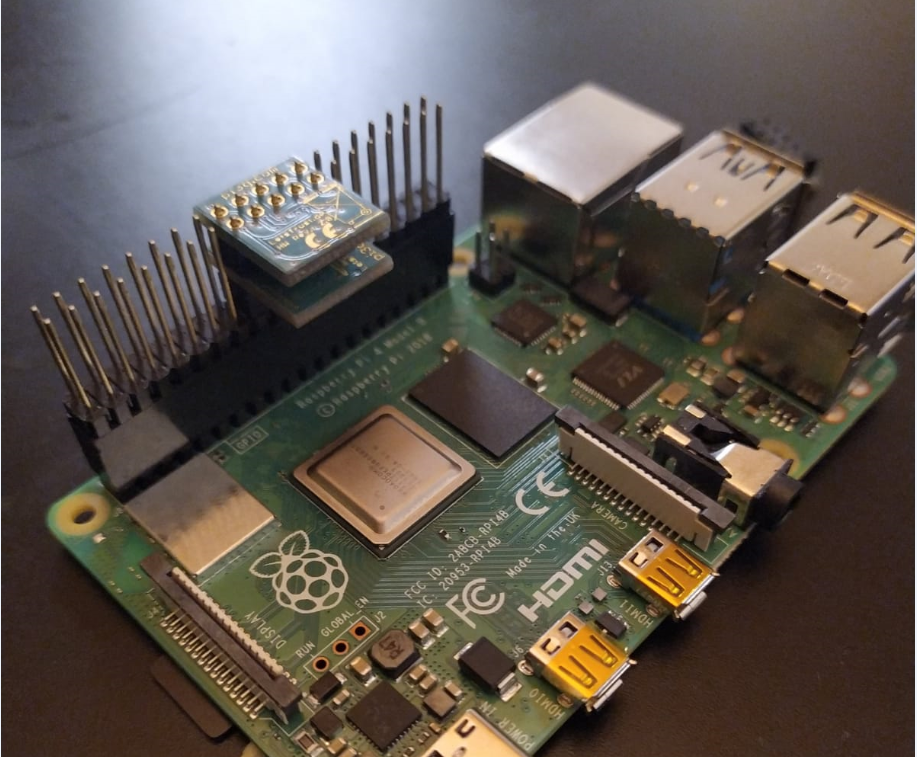 Hardware configuration of the two TPMs:
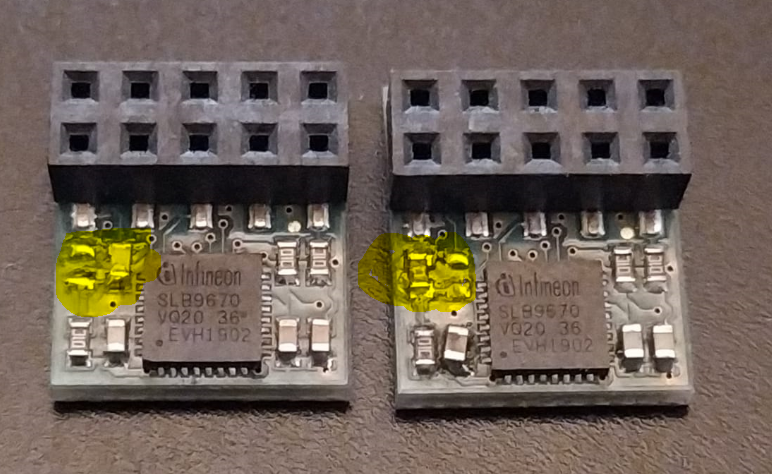
and you'll need 2 TPMs, with one 0Ohm Resistor on position CS0. [1]
Linux log
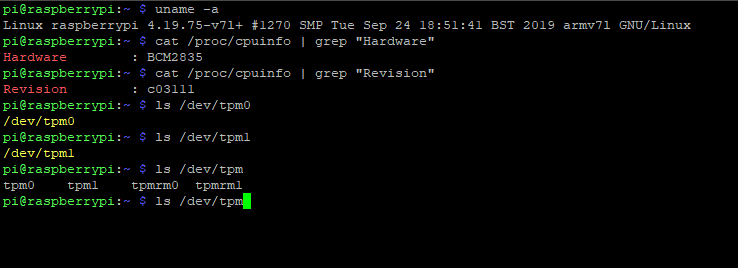
I hope this will be helpful for you, too.
Bye for now!
Paul
[1]
References:
https://letstrust.de/archives/24-Hardware-update!.html
https://letstrust.de/uploads/letstrust-v2.2.placement.cs0.pdf
https://letstrust.de/uploads/letstrust-v2.2.placement.cs1.pdf
Hello and welcome back!
Today I'll introduce you to a new TPM project.
Pierre Fontaine combines a Raspberry Pi, Yocto and a TPM.
He invested a lot of time on his project and I'll appreciate his work with a blogpost here, here is a qoute from his website:
The Raspberry, Yocto Project and The TPM!
Overview
In the cybersecurity field we need to play with crypto primitives. It allows us to authenticate for services (ssh, vpn ...), encrypt files for confidentiality, sign mail for proving your identity to the recipient, and even securing the boot of a complex device ...
So you do need to store keys and use crypto algorithms such as RSA, ECDH, AES compliant with some criteria (industry, military, medical ...).
[1]
Thank you Pierre to share you knowledge!
Here is the Link:
Raspberry Pi, Yocto and a TPM
By for now!
Paul
[1] © Copyright 2019. Jerome Blanchard, Romain Brenaget and Pierre Fontaine
Welcome to the November of posts,
Today: Using a Trusted Platform Module for endpoint device security in AWS IoT Greengrass!
The credits goes to:
The Infineon guys for build an example for use a TPM and pkcs11 in an AWS IoT greengrass environment and share it on github[1].
And Krishnan Ganapathy from amazon web services writes a blog article about it[2].
Thanks for the great work!
Bye for now!
Paul
[1]
https://github.com/Infineon/amazon-greengrass-hsi-optiga-tpm
[2]
https://aws.amazon.com/de/blogs/iot/using-a-trusted-platform-module-for-endpoint-device-security-in-aws-iot-greengrass/
Welcome!
The last time i get some questions about the chipselect configs for the module.
How you could move the default config from the LT-TPM CS1 to CS0.
If you want to use the TPM with CS0 you must change (resolder) the position of the 0Ohm Resistor to the open pads.
You'll see the difference if you open both pdfs:
letstrust-v2.2.placement.cs1.pdf
letstrust-v2.2.placement.cs0.pdf
If you don’t want to compile your device-tree-overlay by yourself, copy the tpm-slb9670-cs0.dtbo [1] to /boot/overlays/ and load the dtbo in the /boot/config.txt
over the setting dtoverlay=tpm-slb9670-cs0
If you want to decompile change and recompile the devicetree for the slb9670 for yourself:
1) sudo apt-get install device-tree-compiler
2) dtc -I dtb -O dts -o /mnt/boot/overlays/tpm-slb9670.dts /mnt/boot/overlays/tpm-slb9670.dtbo
3) cp mnt/boot/overlays/tpm-slb9670.dts /mnt/boot/overlays/tpm-slb9670-cs0.dts
4) dtc -I dts -O dtb -o /mnt/boot/overlays/tpm-slb9670-cs0.dtbo /mnt/boot/overlays/tpm-slb9670-cs0.dts
[2][3]
Bye for now!
Paul
[1]
tpm-slb9670-cs0.dtbo
[2]
tpm-slb9670.dts
[3]
tpm-slb9670-cs0.dts
PS: this will only work on the Raspberry Pis 0-4
Hello!
I've updated the pcb-design,[1]
Now we have the revision 2.2!
Changes from rev 2.0 to rev 2.2 [2]
Add 100nF capacitor on the RESET line of the TPM for a better POR (Power On Reset) behavior..
Change pad 1 from octagon to square, for better identify pin 1.
Add tiny labels on every pin on the bottom side (without MISO/MOSI/CLK, no place for the labels on these pins)
I added a legend in the schematics, for better reference if you want to use the TPM on your own Hardware design.
Placement and the schematic you will find in the right column.
Bye for now
Paul
[1] two months ago
[2] Revision 2.1 was never produced.
Hello again,
in September this year I get mail from Luke Hinds, with some questions about the compatibility from LetsTrust-TPMs and RaspberryPis to check if will work for his project.
Now I proudly happy to link to this hilarious Project:
keylime.dev
Quote from Keylime.dev:
“Keylime is about making TPM technology accessible for developers and users. It handles the complexity, you drive the use case!”
Thanks to Luke and all contributors of Keylime!
Bye for now,
Paul
Welcome back!
no I´m not dead, \o/ ,
but the vulnerability ---TPM-fail--- need my highest attention today.
The good news: LetsTrust-TPMs are not affected!
But I'm not a friend of “hiding” information:
The SLB9670 that we used on our PCBs has the same certification levels on Common Criteria EAL4+ and FIPS 140-2 as the fTPM from Intel and the ST33 from STM.
If I get new information of the Chip on our LetsTrust-TPMs, I'll post an update here.
UPDATE: Quote from
http://tpm.fail/tpmfail.pdf
Our analysis reveals that Intel fTPM and the dedicated TPM
manufactured by STMicroelectronics leak information about
the secret nonce in elliptic curve signature schemes, which
can lead to efficient recovery of the private key. As discussed
in Section 6, we also observe non-constant-time behavior by
the TPM manufactured by Infineon which does not appear
to expose an exploitable vulnerability.
Bye for now
Paul
UPDATE: Reference:
tpm.fail
Reference:
zdnet.com
CVE-2019-11090 and impacts Intel's Platform Trust Technology (PTT).
CVE-2019-16863 and impacts the ST33 TPM chip made by STMicroelectronics.
Hello TPM friends,
after more than 18 months of work, compiling, testing, tears, blood...
MAINLINE! \o/
(On the RPi repository)
Now you find the dto in the newest raspbian image, per default.
To activate the TPM on your Raspberry Pi you need only these simple commands:
sudo apt-get update
sudo apt-get upgrade
sudo nano /boot/config.txt
sudo nano /boot/firmware/config.txt // for new RaspberryPi OS
// and activate SPI with uncomment
"dtparam=spi=on"
// and load the TPM device tree overlay with
"dtoverlay=tpm-slb9670"
// save the config.txt
sudo reboot now
// after the reboot
ls /dev/tpm*
// if you own a LetsTrust-TPM and plug it in the right way, you will get /dev/tpm0 and /dev/tpmrm0 in yellow letters
Thanks to all supportes

Bye for now!
Paul
Hello and Welcome!
I forgot these old post, the initial date in the database: 2017-05-10 01:00
Now, you may have fun with my old thoughts about the TPM market and the beginning of LetsTrust xD
(Expand to read the rest of this post)
Continue reading "Background of these blog"
Hello and welcome!
I´m really proud to introduce the new way to get your LetsTrust-TPM working with your Raspberry Pi!
Till the next Stretch update from the RasPi Foundation the way will be:
Step one:
Open a (whatever) term on your Pi.
Step two:
Run a "sudo rpi-update"
Step three:
Open the /boot/config.txt with "sudo nano /boot/config.txt"
and activate SPI with uncomment
"dtparam=spi=on"
and load the TPM device tree overlay with
"dtoverlay=tpm-slb9670"
Step four:
Plug your LetsTrust-TPM onto the right pins and reboot your Raspberry Pi
Step five:
Open a (whatever) term on your Pi and type "ls /dev/tpm0" and
/dev/tpm0 will appear in yellow letters!
Step six:
Be happy about your success!
Huge thanks to a friend of mine an ex colleague: Peter Hüwe.
He found this smart solution
[1] for the Pull Request issues
[2].
Thank you Phil Elwell for evaluation, identifying problems and finally merging the PR
[3]
Bye for now!
Paul
[1]
https://github.com/torvalds/linux/commit/2f7d8dbb11287cbe9da6380ca14ed5d38c9ed91f
[2]
https://github.com/raspberrypi/linux/pull/2585#issue-195047458
[3]
https://github.com/raspberrypi/linux/pull/2585#issuecomment-444077311
Hello!
I´ve pached again, the new Raspbian Stretch image with Kernel 4.14.81
.71/
.49/
.56/
.66 and TPM support \o/
This Image is tested on:
- RaspiPi 0W
- RaspiPi 2b
- RaspiPi 3b
- RaspiPi 3b+
Some Links:
Image (~1.04 GB)(~1.7 GB)
Checksum md5
Checksum SHA256
Checksum SHA512
Have fun!
Bye for now!
Paul
UPDATE
Hello!
I´ve pached again, this time its a Raspbian Stretch
LITE image with Kernel 4.14.81
.71/
.49/
.56/
.66 and TPM support \o/
This Image is tested on:
- RaspiPi 0W
- RaspiPi 3b+
The links with checksums:
Image (~403 MB)
Checksum md5
Checksum SHA256
Checksum SHA512
Have fun!
Bye for now!
Paul
UPDATE:
New RaspberryPi -> New Image!
All links are changed: Have fun!
Ein neuer RaspberryPi -> Ein neues Image!
Alle Links sind geändert: Viel spaß!
//German version below
Hello everybody,
months without new blog posts, please apoligize, I had so much to do the last months.
Now i´ved patched the last Raspbian-Image "Stretch" with the TPM-SPI-driver, you´ll find the Image on this
LINK.
In this Image the eltt2 tool ist NOT pre compiled.
please use:
git clone https://github.com/Infineon/eltt2.git
cd eltt2
make
sudo ./eltt2 -g
sudo ./eltt2 -h
Have fun!
Bye for now!
Paul
// Deutsche Version
Hallo zusammen,
Monate ohne neue Blog-Postings, bitte entschuldigt, ich hatte einfach zu viel zu tun./
So, jetzt habe ich das letzte Raspbian-Image "Stretch" mit dem TPM-SPI-Treiber gepatcht, dieses findest du auf diesem
LINK..
In diesem Image ist das eltt2-Tool NICHT vorkompiliert.
Um dies zu ändern:
git clone https://github.com/Infineon/eltt2.git
cd eltt2
make
sudo ./eltt2 -g
sudo ./eltt2 -h
Das wars für heute!
Paul
DSVGO: Deutsche Version weiter unten.
Privacy Policy
Continue reading "GDPR / DSVGO"
//Germanversion below
Hello everybody,
currently there is a problem in the firmware of the TPM chip from Infineon which was installed on the LetsTrust TPM modules.
Information about the problem can be found at the following links:
•
https://www.infineon.com/TPM-update
•
https://portal.msrc.microsoft.com/en-us/security-guidance/advisory/ADV170012
•
https://sites.google.com/a/chromium.org/dev/chromium-os/tpm_firmware_update
Not affected are firmware versions >= 7.62.3126 for TPM 2.0.
You can check this under Linux with the eltt2 and the command "sudo ./eltt2 -g".
Unfortunately, there is currently no update tool which I could link here.
Max of pi3g has assured that he will take care of the rapid exchange of the modules.
Please note that when exchanging your module, all keys generated in the TPM and, of course, the stored keys will also be lost. Please take appropriate measures, for example, endcrypt your backups ^ __ ^.
Bye for now!
//German Version
Hallo allerseits,
aktuell gibt es ein Problem in der Firmware des TPM-Chips von Infineon welcher auf den LetsTrust-TPM-Modulen verbaut wurde.
Informationen zu dem Problem findest du unter folgende Links:
•
https://www.infineon.com/TPM-update
•
https://portal.msrc.microsoft.com/en-us/security-guidance/advisory/ADV170012
•
https://sites.google.com/a/chromium.org/dev/chromium-os/tpm_firmware_update
Nicht betroffen sind Firmwareversionen >= 7.62.3126 für TPM 2.0.
Prüfen kannst du dies unter Linux mit dem eltt2 und dem Befehl „sudo ./eltt2 –g“.
Leider gibt es aktuell noch kein Update-Tool welches ihr ich hier verlinken könnte.
Max von pi3g hat mit zugesichert, dass er sich um den zügigen Austausch der Module kümmern wird.
Bedenk bitte, dass bei dem Austausch deines Moduls alle im TPM generierten und natürlich auch die gespeicherten Keys verloren gehen. Treffe bitte entsprechende Maßnahmen entschlüssele zB deine Backups ^__^.
Bis bald!
Paul
Neues Plug&Play Image und diesmal: Eines für alle RaspberryPi´s!
Es handelt sich hierbei um ein frisches "Jessie" Image vom 21.06.2017 mit dem Kernel 4.9.33.
Der Pinguin hat freundlicherweise ein ungestartetes Jessie wie in diesem
Post beschrieben modifiziert.
Lade dir das
Image herunter.
Entpacke es und spiele das Image auf eine SD-Karte.
(Hierbei wird alles auf der SD-Karte vernichtet!)
Einfacher gehts nun fast nicht mehr.
Ist das LetsTrust-TPM an der richtigen Stelle und vor dem Booten gesteckt solltest du mit:
ls /dev/tpm0
dich vergewissern, dass das TPM erkannt wurde.
Nun zum ersten Kommando zum TPM
Im home Verzeichnis findet ihr im Ordner "TPM-Tools" das eltt2.
Öffnet ein Terminal:
cd /TPM-Tools/eltt2/
make
sudo ./eltt2 -G 20
Ihr habt nun 20 Byte Zufallszahlen vom LetsTrust-TPM erhalten!
Bis bald!
So, ich habe nun das Modul, und jetzt?
UPDATE:
Es gibt nun ein neues Plug&Play Image: Eines für alle Pi´s.
Hier findest du den Eintrag dazu:
Link
Veraltet:
Du hast nun drei Möglichkeiten:
1.: Lade das Image für den Raspberry Pi herunter und kopiere dieses via dd auf eine SD-Karte >=4GB.
Image: plug_n_play_image.img
How to Plug and Play Image:PlugandPlayImage_en.txt
Prüfsummen des Images:
MD5: 27aeac85aa4e1ca1588808ad5b988a25
SHA-1: ceab60c4b538313a28d59b8bfce8184a7ad83f02
SHA-256: 88216ab485b93a706d229a9e95c99a0fa32291964b65c8fafb48440dc904eb9c
2.: Die vorkompilierten Module und den passenden Devicetree Eintrag im eigenen Kernel verwenden, die Anleitung und die Module sind gepackt.
Archiv: precompiled_modules_en.zip.
Prüfsummen des Archivs:
MD5: 5ea87f7068ff0603d673b017e4175097
SHA-1: 2cd863bdb67260f2eabbf73405a483e6153b5d28
SHA-256: 355b901178c39eb19398d9c352829923492a9e6987e1f3651a9a757955ad2559
3.: Oder der steinige und harte Weg: Kernel selbst bauen und patchen.
Anleitung und den Patch hierzu findest du in diesem Archiv:
compile_complete_kernel_en.zip
Prüfsummen des Archivs:
MD5: 7607cc3c35407f51fef23e44be2c32eb
SHA-1: d5a0b42ca40158ce30ef3a1ddef8f11ae383b732
SHA-256: 2eec1442315a1cd0691626bd6910ff54128d03793bf1eb2701aea4b54e8034bd
Happy Patching!
Das war´s für heute!
Bis bald!
Dieser Eintrag ist eine Linksammlung auf alles Relevante, was mit dem TPM zu tun hat.
Vollständig wird diese Liste nur durch eine Mail von dir mit dem Link an: info[at]LetsTrust[punkt]de
Was ist ein TPM und wofür ist es gedacht?
deutsche Wikipedia
englische Wikipedia
Wer spezifiziert denn so ein TPM?
Das ist die TCG -> Trusted Computing Group
https://trustedcomputinggroup.org/
Welchen Chip-Hersteller habt ihr gewählt?
Wir haben ein Infineon SLB 9670 TPM 2.0 FW 7.40 verbaut,
Chip Beschreibung
Das Datenblatt:
Datenblatt
Was kann ich sonst noch lesen?
Eine sehr nützliche App-Note von Infineon für den Raspberry Pi 3:
Application Note
Dieser Blog ist empfehlenswert:
mjg59
Und explizit diese Artikel:
Eintrag1
Eintrag2
Eintrag3
Eintrag4
Eintrag5
Eintrag6
Und gibt es Repositories?
Klar gibts dazu ein paar:
Github.com/TPM 2.0 Tools
github.com/SoftwareStack
github.com/Infineon Embedded Linux TPM Toolbox 2.0
Other TPM Stuff
und natürlich
github.com/ suche nach TPM
Wenn du gerade an einem Projekt arbeitest, her damit, ich verlinke es gern!
Okay, verstanden, wo bekomme ich so ein Teil?
BuyZero.de
Das war's für heute.
Bis die Tage!